The South African Schools Collection PR
A South African First – Students Succeed On The Device They Choose
South Africa is celebrating a new milestone in digital education — one shaped by visionary leadership, pioneering methodology, and students who proved what’s possible when learning adapts to life.
The formula that makes mixed-device learning work
Under the guidance of Christian Brothers’ College Boksburg (CBC) Headmaster, Mr Toby Craig — a strategic thinker and catalyst for digital transformation — the school adopted a forward-thinking formula: ILAMM – Integrated Learning and Mentoring Methodology; Knowledge Network’s non-overlapping digital‑skills programme that enhances rather than duplicates government subjects; Google’s platform; web-based apps; and a Choose to Bring Your Own Device model grounded in a simple principle: bring what you have; we will teach you to succeed.
This formula works because ILAMM is a relationship-based methodology that depends on teachers and students being active participants in learning. Teachers are mentored to guide mixed-device learning with confidence, and students are mentored to learn on whichever device they choose — ensuring every choice becomes a pathway to success.
In the classroom, Ms Vanessa Campbell — a distinguished ILAMM practitioner whose presence, commitment, and mastery help every student achieve on the device they choose — brought this vision to life. In real life, students switch naturally between devices depending on their day, activities, and what’s practical in the moment. ILAMM supports this reality.
Before exploring how this innovation unfolded in practice, we begin with the voice of a student who lived it. Nkateko Baloyi, Grade 10, who received the Excellence in Technology Integration Award. He shares his honest account of the course, the assessment, and how learning across devices shaped his confidence and skills.
After Nkateko’s story and award photo, Jil Hrdliczka, Knowledge Network’s Founder and architect of ILAMM, explains what the award recognises. There is also a sample of the actual exam paper the students worked from – the same standard applied to every student, no matter which device they use.
We then hear from Uriel Moonsammy, also a Grade 10 student who completed the entire assessment on his phone, Demonstrating learn-with-any-device learning.
Nkateko shares his journey:
“If I’m being honest, this isn’t a very difficult course. I’d show up, do the work, and next thing I knew I was being handed a fancy trophy.
“The work was straightforward. I would sit in class with Mrs Campbell and copy the slides and docs she made. While it’s not a lot of effort to copy, the real art of the subject was learning how to adapt to new scenarios and criteria.
“We were shown different scenarios, and we had to use skills we learned through copying to make Slides and Docs appropriate for each scenario. This is exactly what we would find in the exams, so I applied myself, and have to thank Mrs Campbell for showing the way.
“I learned about the Google platforms. (Docs, Slides, Sheets, etc.) through the course which helped tons at the time because Microsoft had become truly awful to use. I was exposed to these new platforms I was never privy to, and I learned how to use them in an effective manner.
“For example, in group public speaking, where we would normally work separately on speeches, using the share features I learned in this course, I got my team on one doc working simultaneously and this synergy helped us perform better than our competitors.
“I only learned how to share, print the docs and slides because I had to show Mrs Campbell my work from time to time, and learning these skills saved me during my exam when my school account failed me and when performing for public speaking.
“Weirdly, this course is done on your own device, which was different from the years prior, and I feel this has the power to help a lot of students and schools. Schools that don’t have the option to install a computer lab or grades like mine who didn’t have access to the lab, still have the option of developing the skills the course offers.
“And students who can’t afford or can’t get access to laptops can still do the course. This worked out in favour of my classmates, who mostly worked on their phones.
“It’s an amazing thing to have adaptable education. As you can guess a phone doesn’t have as many options for working as a laptop, so Mrs Campbell and the Knowledge Network team made sure that my class could pass by adapting the exam to their device’s capabilities.
“The lessons I learned really saved my butt when it came to passing my other classes as well. In Technology I used slides to compose my projects and docs to write my plans. In History and Geography, I used the lessons on AI we had earlier in the year to assist in research.
“This is a course built on the idea of adaptation and preparation for the future, and I learned a ton from it.
“Firstly, how to look for new options when other things fall through. For example, I had to write this on my phone and restart from zero because my laptop stopped working.
“Secondly, it gave me the ability to learn new lessons that changed how I work in my everyday life and provided me with the tools to utilize those lessons.
“Thirdly it showed me that there are teachers who go beyond the measurable limits to help students succeed. That is to say, Mrs Campbell is truly the only reason I have the honour of writing this. She pushed me at every step and for that I am eternally grateful.
“So yeah, this course is easy, but that might just be because I had a teacher willing to do the most to make me successful.”
What this award really recognises
The course assessment — the same exam Nkateko and Uriel describe — mirrors real-world digital learning, where students work with the devices they already own. In a Bring Your Own Device model, the aim is not to standardise hardware but to standardise learning.
Allowing students to complete the exam on any device makes technology accessible, flexible, and choice-driven. Completing it on a phone is particularly significant. Phones are not traditionally viewed as classroom tools, yet they are often the most available.
When a student interprets data, creates bitmaps and vector graphics, designs icons, builds diagrams and graphs, writes and formats content, uploads and downloads work, and completes the full assessment on a small screen, they show genuine digital competence — not reliance on specialised equipment or AI shortcuts.
AI still plays a role, but in the right way. Students are mentored to use AI tools for research support — gathering and verifying background information — but the creation of assessment artefacts must be their own work. This ensures they develop essential skills in planning, designing, problem-solving, and representing information visually — skills AI cannot replace.
These skills directly support learning across other subjects:
- Mathematics: representing data accurately through graphs and diagrams.
- Geography: working with maps, symbols, and visual information.
- Languages: preparing visual presentations, digital submissions, and verbal projects.
- Life Orientation and Social Sciences: gathering information, evaluating sources, and communicating findings.
- Creative subjects: applying principles of layout, colour, and visual hierarchy.
In Nkateko’s article, he demonstrates these skills across Public Speaking, History, Geography, and Technology. The course does not compete with subjects such as CAT, IT, Coding and Robotics, Technology, or Creative Arts — most of which the school already offers. Instead, it acts as the glue: the enabling “know-how” that empowers students to use whatever technology they have in everything they do for school, work, life, and university.
We need our students to have the skills to compete for opportunities across the world. This course is the starting point. Students gain the skills, use them, and apply them across life. They don’t have to wait for the next computer lab visit — they gain experience every time they access their own or any device. Their progress accelerates because they drive it themselves.
It all happens online, mirroring the way modern learning and workplaces function. Working online teaches students how to collaborate, share files, submit work digitally, and manage cloud-based tools — essential in real life.
Whether uploading a diagram for the teacher, sharing a link with a peer, or downloading a resource to complete a task, students practise the same digital behaviours used in universities, workplaces, and global communication. Online work also encourages collaboration: students learn to exchange ideas, give feedback, and co-create resources across different devices and platforms.
Course assessments are uploaded, marked, and moderated. A score of 70% earns students a Knowledge Network Certificate of Successful Completion, issued and distributed digitally by the teacher.
Behind the scenes are ILAMM, the teacher, and the school. Together, they make this programme — with its different levels — work because they honour the whole student: their device, context, strengths, talents, and growing digital identity.
It creates a learning environment where adaptability, collaboration, creativity, confidence, the teacher’s gentle push to achieve, and technical understanding come together naturally. It prepares students not just to pass an exam, but to thrive in a world where digital fluency and flexible problem-solving are essential.
Uriel explains his experience:
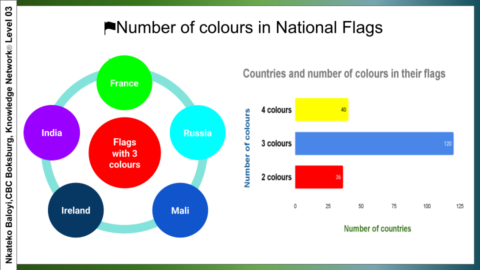
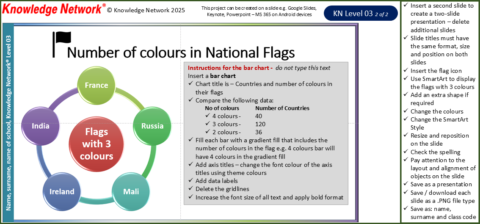
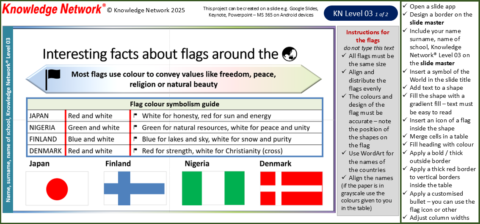
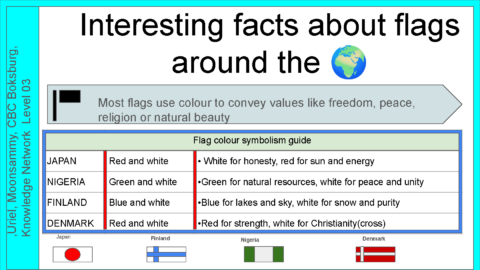
“For this exam, I created the layout by using shapes, charts and text boxes. I started by adding a title and my name at the top. Then I inserted a bar graph to show the number of colours in national flags, and I edited the data to match the information. After that, I added a table to explain what different flag colours mean for countries like Japan, Finland, Nigeria and Denmark. I also added small circles to create a visual diagram that shows the different colours. Finally, I arranged everything neatly, so the project looks clear and easy to read.
“It was difficult to do this project on my phone because the screen is small, and it was hard to move and resize the charts and text boxes accurately. It also took longer to type and switch between tools compared to using a laptop.
I overcame the challenges by working slowly and carefully, zooming in when needed, and double-checking my layout. I also broke the work into smaller steps, so it was easier to manage on a small screen.”
Why phone-based assessment adds value
Students completing assessments on a phone gain an additional layer of digital fluency. Working on a small screen requires them to understand their device’s capabilities and limitations, adapt their workflow, and make deliberate choices about tools and file handling. They learn to judge what their phone can and cannot do and adjust their approach to meet the criteria.
This becomes a powerful skill: evaluating a device, working within its constraints, and still producing high-quality digital artefacts. Uriel’s experience shows this adaptability in action.
A formula for real-world learning
Nkateko completed his assessment on a laptop while classmates succeeded on their devices, and Uriel completed his on a phone.
Their experiences — alongside the pioneering work of Jil Hrdliczka, marking another South African first — show how a choice-driven model reshapes digital fluency.
Key takeaway
This teacher – and ILAMM‑led, choice-driven digital learning formula — combining a non-overlapping digital skills programme, Google’s platform, web-based apps, and Choose to Bring Your Own Device — is replicable anywhere, works with any device, requires only Wi-Fi, data projection, and storage. It reflects real‑world learning: students switch naturally between phones, tablets, Chromebooks, and laptops depending on their day and activities. This flexibility strengthens digital fluency and ensures the formula can benefit millions of students and teachers worldwide.
ILAMM in one breath
ILAMM – Integrated Learning and Mentoring Methodology® — is a relationship-based mentoring methodology that makes learning easier and more meaningful. It integrates teaching and mentoring, promotes iterative growth, builds student agency and ownership, works with any device on any platform, and strengthens purposeful language use — because language is how students think, express, and connect. ILAMM develops communication, creative, critical, logical, lateral thinking and problem-solving skills; builds confidence, self-esteem, and self‑worth; and honours the whole student and the whole teacher.